

What DeMinds Is: Positioning, Value, and Product Boundaries
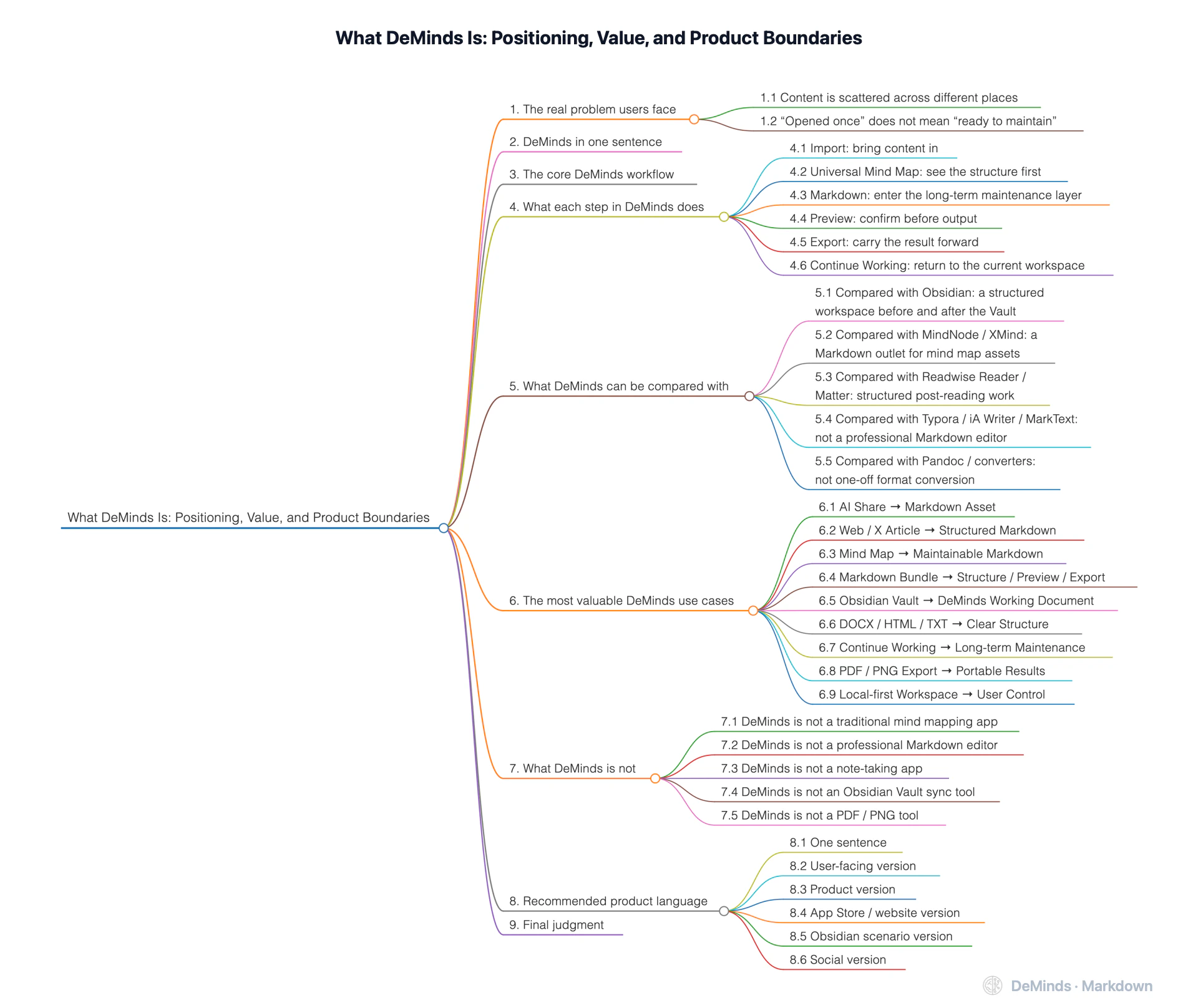
If you want to understand what DeMinds is not, and what problem it is truly designed to solve, start here.
DeMinds is not a traditional mind mapping app, not a professional Markdown editor, and not a note-taking app.
Its more accurate position is: a local-first structured Markdown workspace.
DeMinds is designed for people who often work with content from many sources: AI conversations, web articles, mind maps, documents, Markdown bundles, selected notes from Obsidian Vaults, project materials, research materials, and writing drafts. It solves not the question of “how to open a file,” but:
How to turn scattered content into Markdown assets that are clearly structured, continuously maintainable, previewable, exportable, and portable.
1. The real problem users face
A lot of content is not lacking in value. It is simply hard to keep using.
1.1 Content is scattered across different places
A user may have, at the same time:
- answers from AI tools
- web pages or long posts on X
- MindNode / XMind / FreeMind mind maps
- DOCX / HTML / TXT documents
- Markdown bundles with assets/* resources
- selected notes inside an Obsidian Vault
- project screenshots, images, demo videos, and attachments
These materials are often valuable, but they are scattered across different tools, formats, folders, and conversation threads.
1.2 “Opened once” does not mean “ready to maintain”
Many tools can open files. But after a file is opened, the content may still remain one-off:
- read once, but not structured
- saved once, but hard to reuse
- exported once, but with broken resource relationships
- converted once, but hard to maintain afterward
- stored locally, but with no clear next step for organization
DeMinds is not trying to provide yet another “opener.” Its goal is to help content enter a sustainable workflow for organization and maintenance.
2. DeMinds in one sentence
DeMinds is a local-first structured workspace for turning content from many sources into maintainable Markdown assets.
More fully:
DeMinds helps users bring AI conversations, web pages, mind maps, documents, Markdown bundles, and selected Obsidian Vault content into a local-first workflow: see the structure first, settle the content into Markdown, then preview, export, migrate, and continue working as needed.
3. The core DeMinds workflow
The DeMinds product flow can be summarized as:
Import → Universal Mind Map → Markdown → Preview → Export → Continue WorkingIn user-facing language:
Content enters → Structure appears → Markdown is maintained → Results are exported → Work continuesThis flow is the key to understanding DeMinds.
4. What each step in DeMinds does
4.1 Import: bring content in
DeMinds can receive content from many sources:
- AI shares and AI conversations
- web articles and long posts on X
- MindNode / XMind / FreeMind mind maps
- DOCX / HTML / TXT documents
- Markdown files
- Markdown bundles with assets/* resources
- Markdown documents explicitly selected from an Obsidian Vault
- local images, attachments, and some media references
The point is not “the more formats, the better.” The point is to let valuable content enter the same structured workflow.
For an Obsidian Vault, DeMinds does not try to recursively import the entire knowledge base. It detects the Vault entry, lets the user choose the Markdown documents they want to read or combine, and normalizes the selected content into a DeMinds working document.
4.2 Universal Mind Map: see the structure first
After content enters DeMinds, the app helps users review its structure through a Universal Mind Map.
The value of the Universal Mind Map is not to replace a professional mind map editor. It is to provide a unified structure layer:
- see heading hierarchy
- identify branches and relationships
- understand the content skeleton
- locate key points quickly
- see the organization inside long text
For mind map files, it helps users review structure across formats. For web pages, AI answers, documents, and selected Vault content, it helps structure emerge from scattered or dense text.
4.3 Markdown: enter the long-term maintenance layer
DeMinds emphasizes Markdown not because Markdown is the only entry point, but because Markdown is well suited to become the long-term maintenance layer where content from many sources eventually settles.
Markdown is valuable because it is:
- plain
- readable
- editable
- portable
- less likely to be locked inside a single tool
- suitable for long-term storage and continued organization
In DeMinds, Markdown is not a side result. It is the key place where content enters a long-term maintainable state.
4.4 Preview: confirm before output
DeMinds provides Markdown Preview, PDF Preview, PNG Preview, and related preview experiences.
Preview matters because it helps users:
- confirm content completeness before export
- check whether images, resources, and video references are visible
- see the result before deciding whether to save or share
- reduce the cost of discovering problems only after export
For Markdown bundles and Obsidian Vault content, Preview is especially important because it helps users verify that text, images, resource paths, Wiki Links, Wiki Embeds, and attachments still work together after normalization.
4.5 Export: carry the result forward
Export in DeMinds is not a single-point “format conversion.” It is the natural outlet of a structured workflow.
Users can export, as needed:
- Markdown
- Full Mind Map PNG
- HTML / OPML and other structured results
- Workspace Backup packages
The core point is not “many export formats.” The point is:
Content can leave DeMinds and continue to be read, shared, archived, or maintained elsewhere.
4.6 Continue Working: return to the current workspace
DeMinds is not a one-time converter. Continue Working is the Current Work Hub in DeMinds.
It helps users return to:
- the Current Working Copy
- pinned important content
- Markdown already inside the Editing Loop
- Document Trash
- workspace restore paths
- Local Workspace or iCloud Workspace state
This turns DeMinds from “convert once” into “keep maintaining.”
5. What DeMinds can be compared with
DeMinds is hard to compare directly with a single app. More accurately, it sits between several tool categories and fills a missing layer between them.
5.1 Compared with Obsidian: a structured workspace before and after the Vault
Obsidian is well suited to long-term knowledge base management:
- backlinks
- tags
- Vault
- Graph View
- plugin ecosystem
- long-term note organization
DeMinds does not replace Obsidian, and it does not try to take over the whole Vault. It is better understood as a structured workspace for two kinds of needs around Obsidian.
The first need happens before content enters Obsidian.
AI answers, web articles, mind maps, DOCX / HTML documents, and Markdown bundles are often not clean enough to enter a long-term knowledge base directly. They may need to be structured, checked, previewed, and settled into Markdown first.
The second need happens after content is already inside an Obsidian Vault.
DeMinds can detect the Vault entry, let the user explicitly choose the Markdown documents to read or combine, and generate a DeMinds working document based on Vault structure. Wiki Links, Wiki Embeds, images, and attachments are handled as static Markdown-friendly content rather than as an Obsidian runtime.
This means DeMinds is not an Obsidian replacement, and it is not a Markdown knowledge base indexer. It helps content enter Markdown, and it also helps selected Vault content leave its original knowledge-base context as a readable, editable, previewable, exportable, and portable working document.
In one sentence:
Obsidian manages the long-term knowledge base; DeMinds helps content before and after the Vault become maintainable Markdown assets.
5.2 Compared with MindNode / XMind: a Markdown outlet for mind map assets
MindNode and XMind are professional mind map creation tools. They are strong at:
- WYSIWYG editing
- node styling
- free-form layouts
- presentations and visual expression
DeMinds should not compete head-on with their mind map editing capabilities.
The value DeMinds offers mind map users is:
The mind map is not the endpoint. Markdown is the maintainable asset.
It helps users turn mind map structures into Markdown, so ideas can continue into writing, documentation, archiving, and export.
5.3 Compared with Readwise Reader / Matter: structured post-reading work
Reader-style apps are good for:
- read-it-later
- saving articles
- highlights
- reading management
DeMinds is more focused on:
- taking articles out of their original web context
- making structure visible
- turning content into Markdown
- continuing to organize and export it
The difference is:
Reader tools help users save reading material; DeMinds helps users turn reading material into maintainable assets.
5.4 Compared with Typora / iA Writer / MarkText: not a professional Markdown editor
Typora, iA Writer, MarkText, and similar tools are well suited to focused Markdown writing.
DeMinds is not currently that kind of professional writing editor. Its Markdown editing capability is more like one part of a content maintenance loop, not the whole product positioning.
DeMinds focuses on:
Content from many sources → Structure → Markdown maintenance layernot:
Writing the most polished Markdown document from scratch5.5 Compared with Pandoc / converters: not one-off format conversion
Pandoc and many converter tools are strong at format conversion:
Input A → Output BDeMinds is different:
Content enters → Structured workspace → Continued maintenance → Export when neededIt is not a command-line converter. It is a content workspace built around the user’s workflow.
6. The most valuable DeMinds use cases
6.1 AI Share → Markdown Asset
Bring answers from ChatGPT, Doubao, Gemini, and other AI tools into your own workspace instead of leaving them inside conversations.
Best for:
- organizing AI answers
- saving prompt results
- reusing research materials
- turning long answers into structured notes
Value:
AI generates. DeMinds helps the result settle.
6.2 Web / X Article → Structured Markdown
Bring valuable web pages, long posts on X, blogs, and product analyses into DeMinds.
Best for:
- technical reading
- product research
- collecting references
- breaking down articles
- future writing
Value:
Not just saving a link, but turning content into editable, exportable material.
6.3 Mind Map → Maintainable Markdown
Bring MindNode, XMind, and FreeMind mind maps into DeMinds, then continue toward Markdown.
Best for:
- turning a mind map into an article
- turning a plan into a document
- turning a course outline into teaching material
- turning a project structure into documentation
Value:
Start from a mind map, but do not stop at the mind map.
6.4 Markdown Bundle → Structure / Preview / Export
Drag a Markdown Bundle with assets/* resources into DeMinds.
Best for:
- Markdown documents with images
- documentation with attachments
- tutorials with demo videos
- content packages that need PDF / PNG output
Value:
Markdown is not an isolated file. It can be a content asset with text, resources, and context.
6.5 Obsidian Vault → DeMinds Working Document
Bring a selected set of Markdown notes from an Obsidian Vault into DeMinds.
Best for:
- extracting one topic from a Vault
- turning a group of Obsidian notes into an article or guide
- checking Wiki Links, Wiki Embeds, images, and attachments
- turning Vault structure into a working document that is easier to read and export
- moving selected knowledge-base content into a lighter Markdown bundle
Value:
Not importing the whole Vault, but normalizing selected Vault content into a DeMinds working document.
6.6 DOCX / HTML / TXT → Clear Structure
Bring traditional documents into DeMinds, see their structure first, then organize them as Markdown.
Best for:
- organizing Word documents
- archiving HTML materials
- restructuring long TXT files
- migrating older materials
Value:
Turn documents that are readable but hard to maintain into structured content.
6.7 Continue Working → Long-term Maintenance
Repeatedly open, edit, restore, back up, and maintain the same content projects over time.
Best for:
- long-term project materials
- research materials
- release copy
- product documentation
- multi-round content refinement
Value:
DeMinds is not a recent-files list. It is the Current Work Hub.
6.8 PDF / PNG Export → Portable Results
Export structured content as PDF or Full Mind Map PNG.
Best for:
- sharing
- reporting
- archiving
- social posting
- deliverable reading versions
Value:
Structure visible. Text editable. Results portable.
6.9 Local-first Workspace → User Control
Save and maintain content in a Local Workspace or iCloud Workspace.
Best for:
- private materials
- business materials
- research documents
- internal plans
- long-term knowledge assets
Value:
The user decides where the data lives.
7. What DeMinds is not
To avoid misunderstanding, DeMinds also needs clear boundaries.
7.1 DeMinds is not a traditional mind mapping app
WYSIWYG mind map editing is not its core. If users want detailed visual mind map creation, MindNode or XMind is more specialized.
DeMinds turns mind maps into maintainable Markdown assets.
7.2 DeMinds is not a professional Markdown editor
It is not Typora or iA Writer. Markdown editing in DeMinds is one part of the workflow.
Its focus is helping content from many sources enter the Markdown maintenance layer.
7.3 DeMinds is not a note-taking app
Tags, databases, backlinks, and complex organization systems are not its core. If users need long-term knowledge base management, Obsidian is better suited.
DeMinds is better as a structured workspace around knowledge-base content: it can prepare content before it enters a Vault, and it can turn selected Vault content into a DeMinds working document.
7.4 DeMinds is not an Obsidian Vault sync tool
DeMinds can read Markdown documents explicitly selected from an Obsidian Vault and normalize them into a DeMinds working document.
But it does not provide:
- in-place Vault editing
- real-time folder watching
- bidirectional sync
- plugin execution
- Dataview query execution
- automatic recursive import of the whole knowledge base
- a replacement for Obsidian Graph View
DeMinds support for Obsidian Vault content should be understood as:
Select content → Normalize structure → Continue workingnot:
Take over the whole Vault → Keep syncing → Replace Obsidian7.5 DeMinds is not a PDF / PNG tool
PDF and PNG are output results, not the product positioning. The core of DeMinds is structure and long-term maintenance.
8. Recommended product language
8.1 One sentence
DeMinds is a local-first structured Markdown workspace.
8.2 User-facing version
Bring AI conversations, web pages, mind maps, documents, Markdown bundles, and selected Obsidian Vault content into DeMinds. See the structure first, maintain the content as Markdown, then export it and carry it forward when needed.
8.3 Product version
DeMinds helps scattered content become structured, maintainable, and portable Markdown assets.
8.4 App Store / website version
Turn mind maps, documents, web pages, Markdown bundles, Obsidian Vault selections, and AI shares into editable structures and portable Markdown assets.
8.5 Obsidian scenario version
Select Markdown notes from an Obsidian Vault and turn them into a structured DeMinds working document.
8.6 Social version
Not just opening content, but helping it enter long-term maintenance.
9. Final judgment
The strength of DeMinds does not come from being the strongest at one isolated feature. It comes from a complete workflow:
Content enters → Structure appears → Markdown is maintained → Results are exported → Work continuesDeMinds is not a replacement for Obsidian, MindNode, XMind, Typora, or PDF tools.
It fills the layer that is often missing between them:
Turning scattered content into Markdown assets that are clearly structured, maintainable over time, and ready to carry forward.
With Obsidian Vault support, this positioning becomes clearer rather than broader: DeMinds does not take over the whole Vault. It helps selected Vault content become a readable, editable, previewable, exportable, and portable Markdown working document.
That is where DeMinds belongs.